WatchFlower

WatchFlower reads whole families of Bluetooth Low Energy plant monitoring sensors and thermometers. Helps keeping your plants alive and your air clean.

desktoplinux | macOS | windows mobileandroid | iOS licenseGPLv3
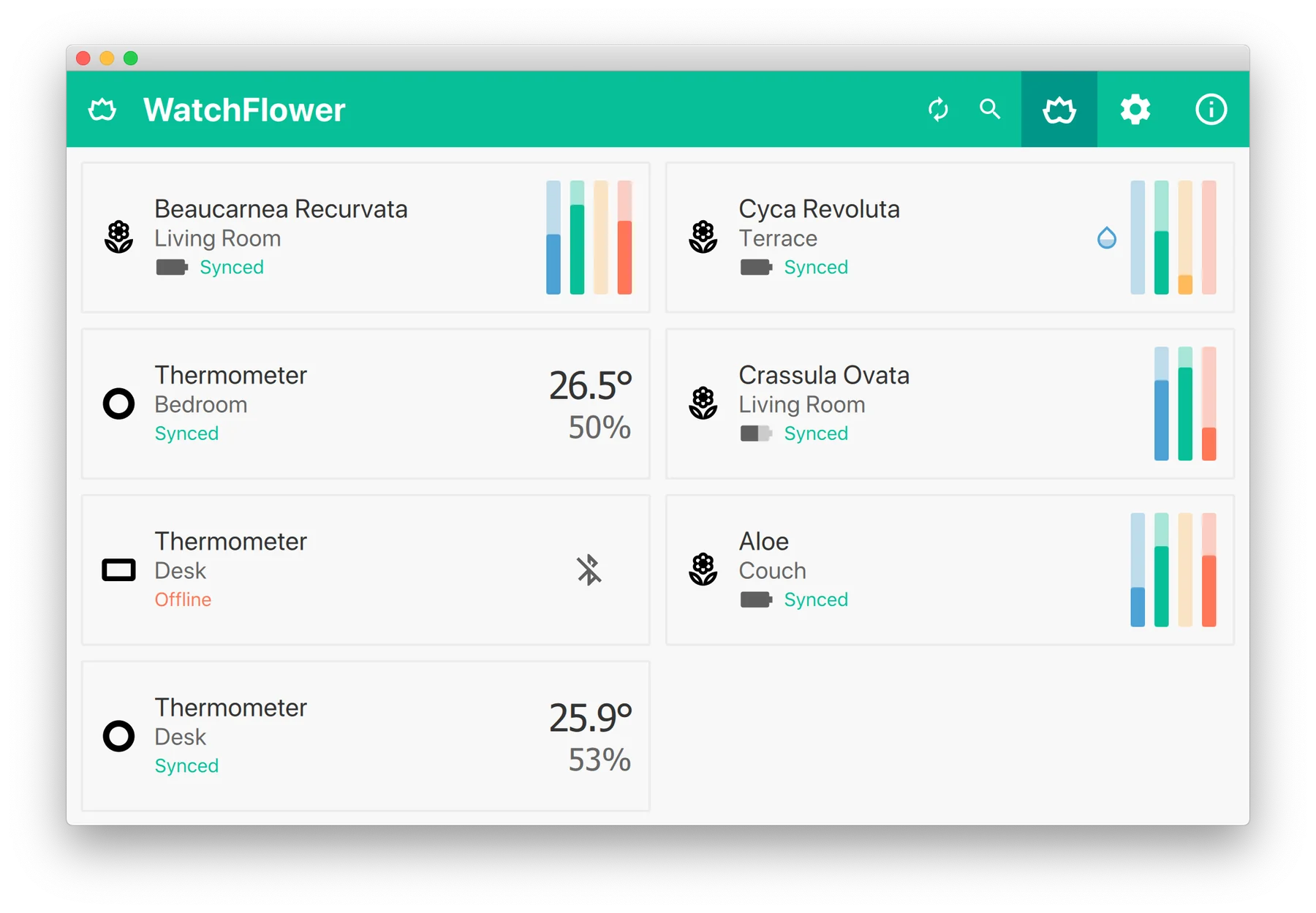
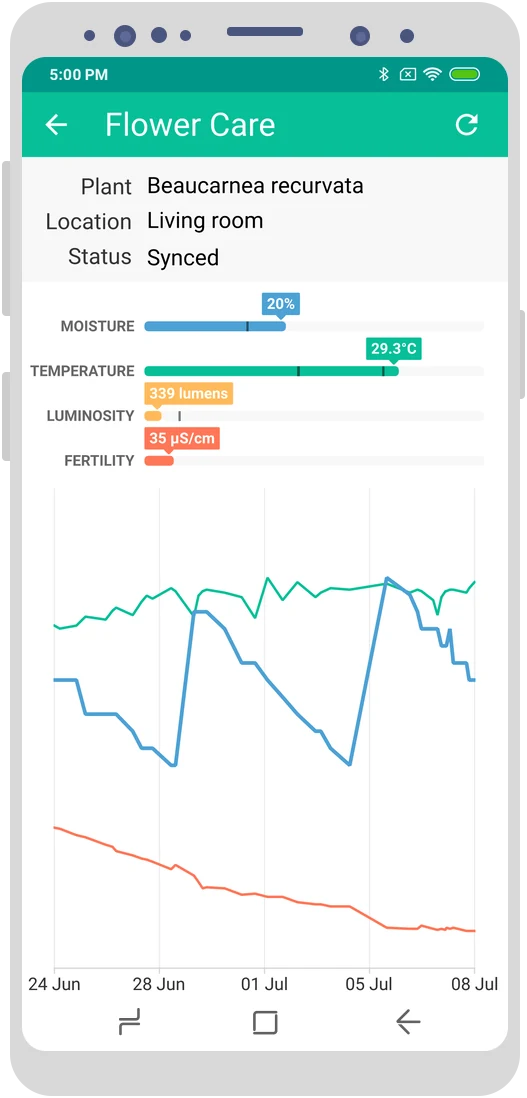
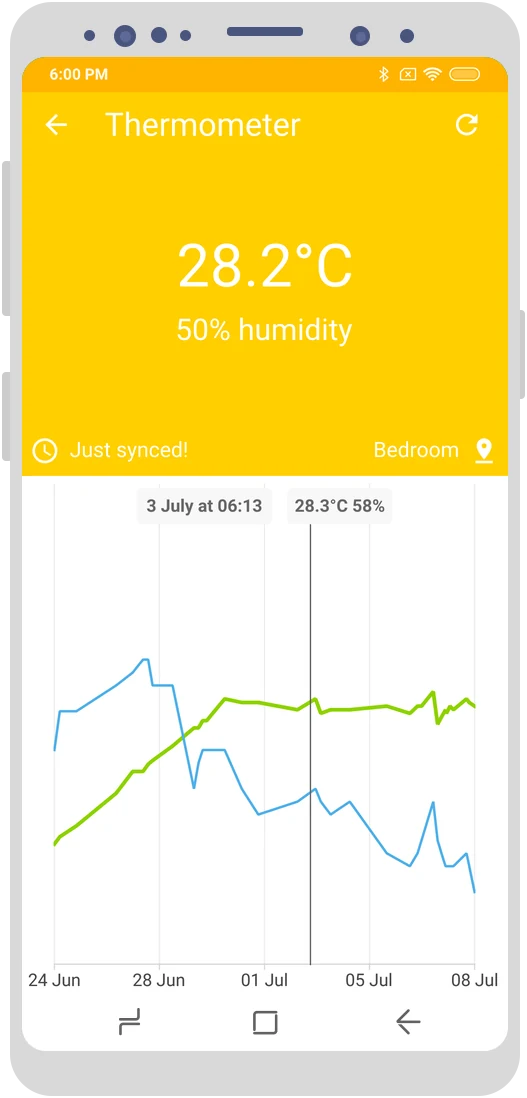
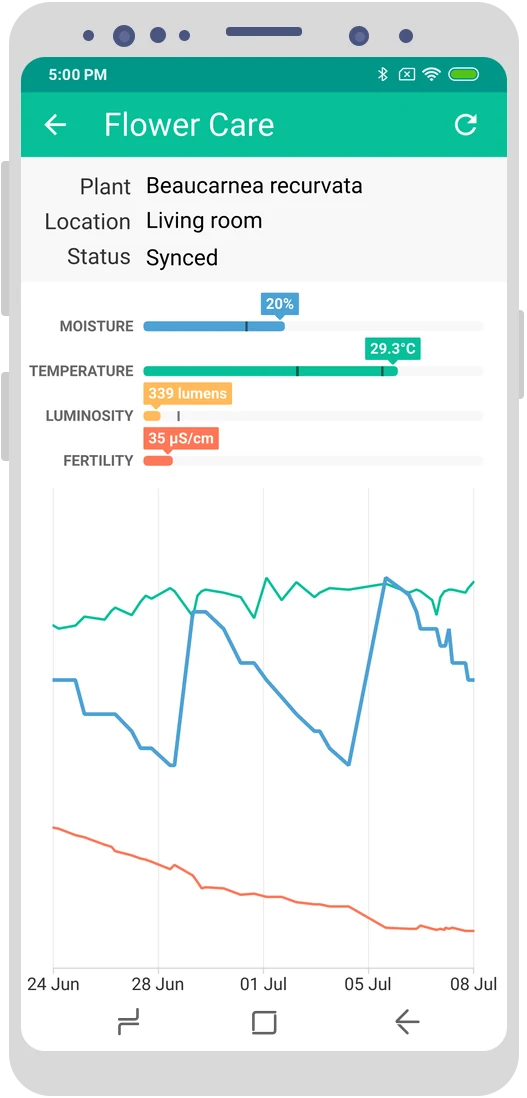
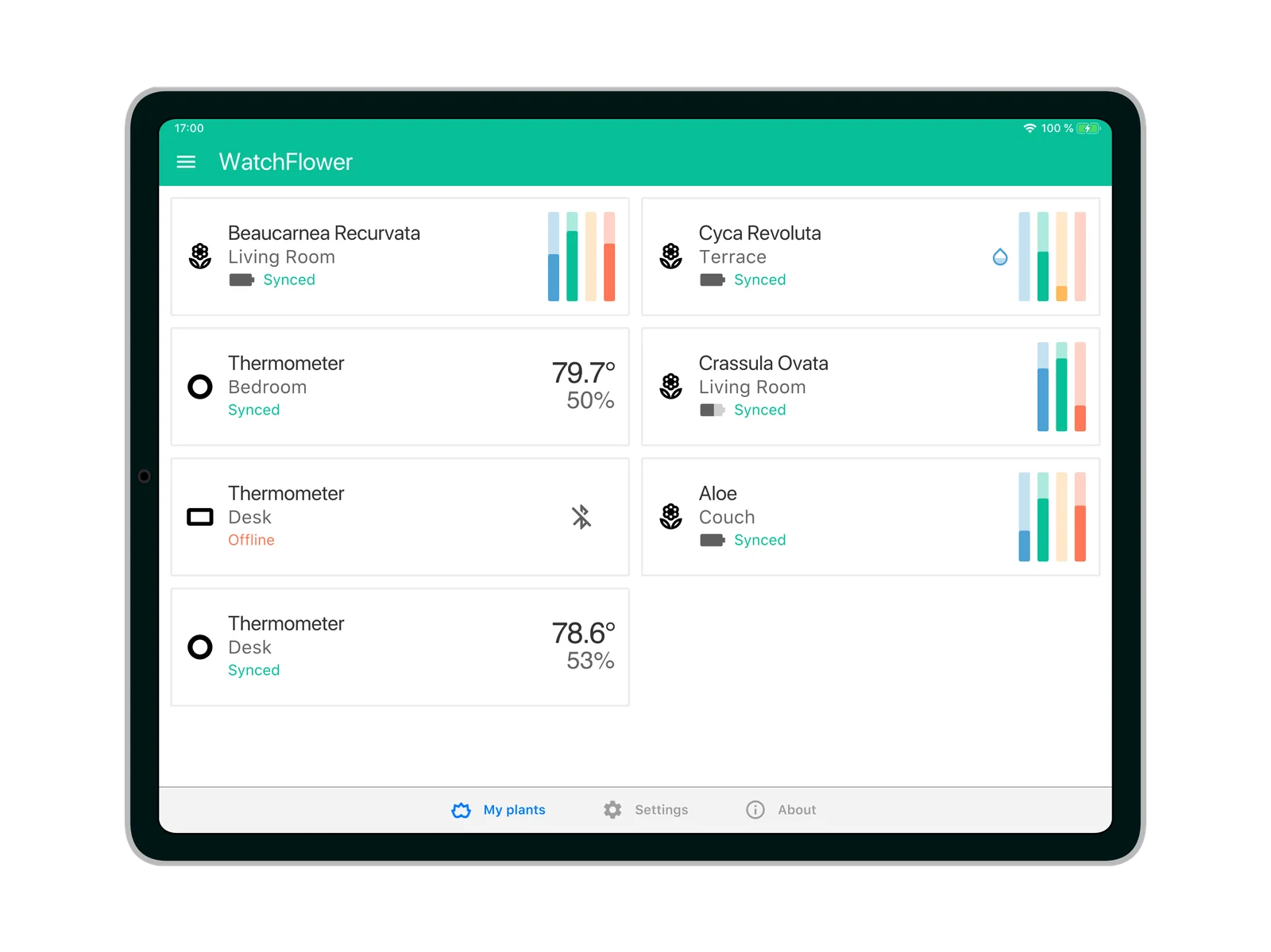
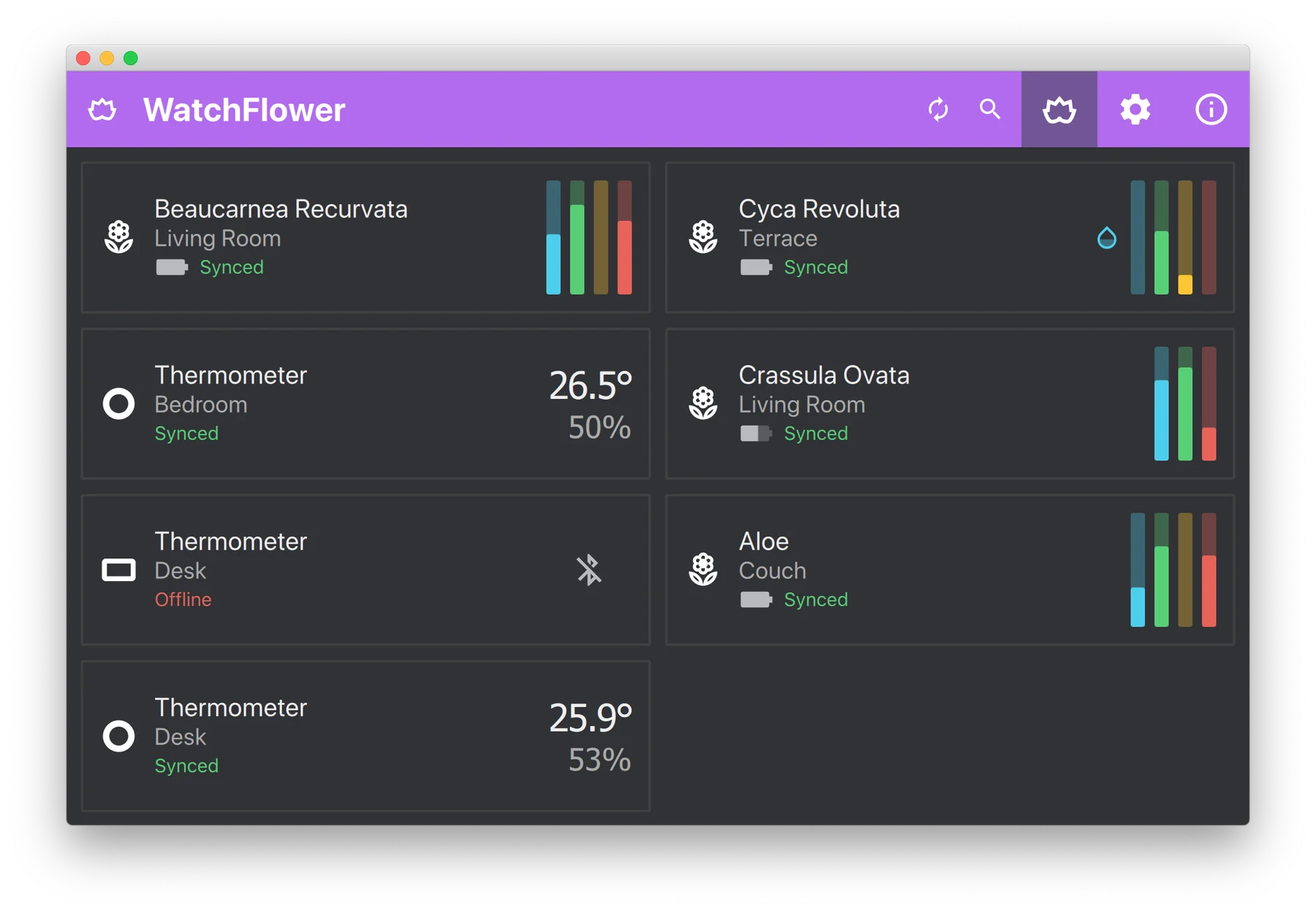
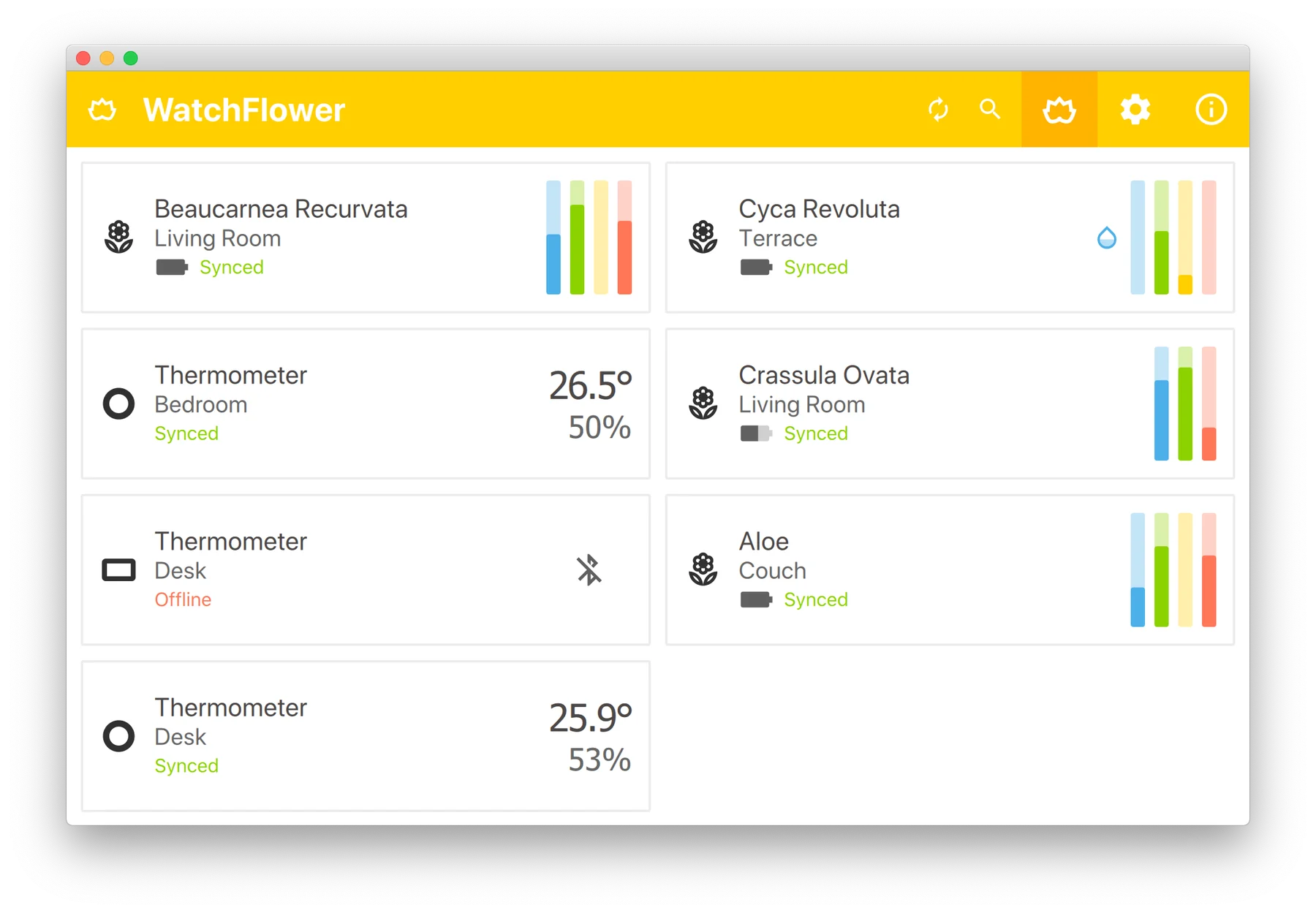
WatchFlower on the desktop, listing plants with their sensor readings and two thermometers Flower Care sensor details on Android, with moisture, temperature, light and fertility charts Thermometer screen on Android showing 28.2°C and 50% humidity
What is WatchFlower

A single app that talks to dozens of plant sensors, thermometers and air-quality monitors — name your plants, set your own limits, watch histories and get notified before anything wilts. No account, no ads, no tracking of any kind (except your plants).

70+supported sensors
14languages
5platforms supported
3400+plants in the database
180dCSV data export
0ads & trackers
01 Why you'll like it

Built for people who love their plants

But who find caring for them a challenge...

Monitor

All your plants, at a glance

Moisture, fertility, temperature and light from a handful of Bluetooth plant monitoring sensors. Watch your flowers' vitals (get it?!) and keep them waterfull. And alive.
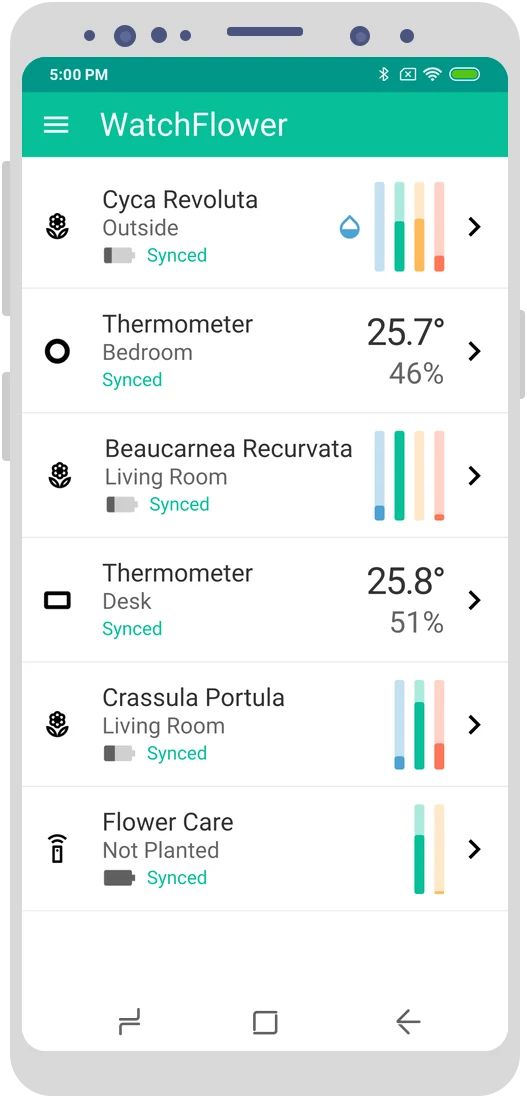
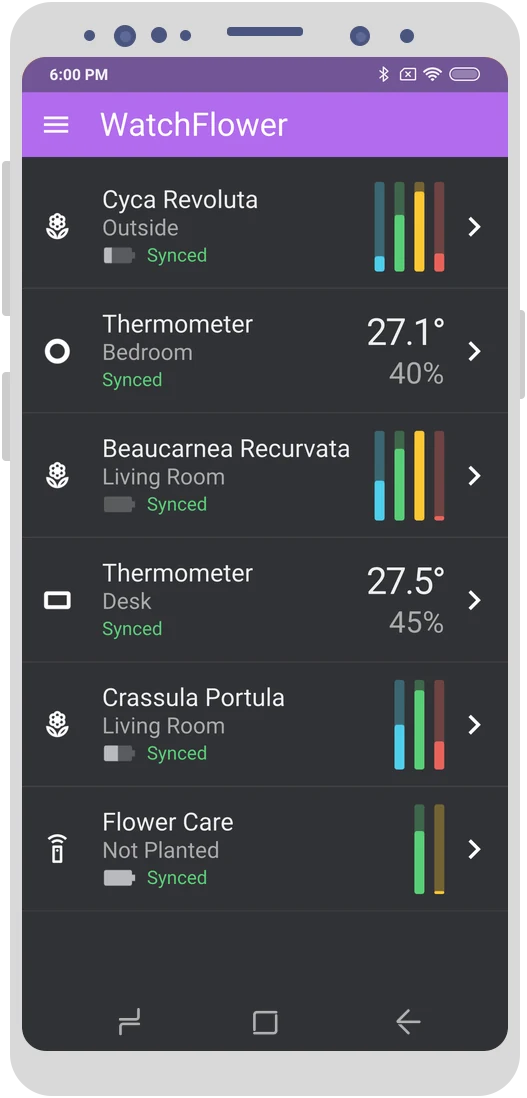
Plant and thermometer list on Android The same list with the dark theme
Notifications

Never miss watering day

Background updates and notifications on desktop and Android

3400+ plants

Your plants, your rules

Name your plants and tune their limits, backed by a database of over 3400 species.

Thermometers

Temperature & air quality

Thermometers, hygrometers and air-quality monitors, for the rooms your plants live in.

History

Pretty charts

Monthly, weekly and daily histograms, plus 180 days of CSV export. Because everyone loves pretty charts.
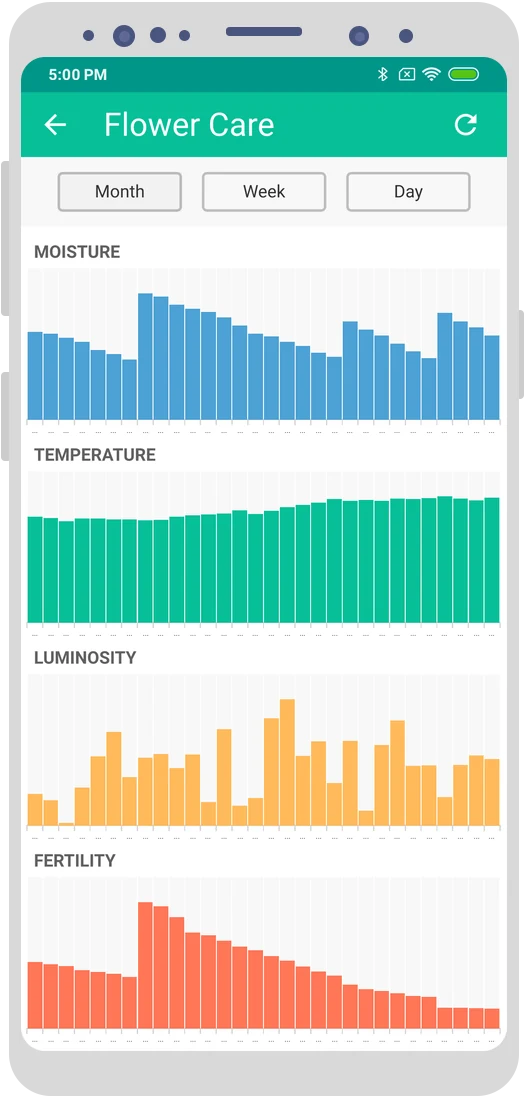
Monthly moisture, temperature, luminosity and fertility histograms
Private by design

Your plants are the only thing we track

No account and no personal data. Read the privacy policy for the details.

  • 0ads
  • 0trackers
  • 0accounts
Bluetooth, not the cloud

Your sensors talk straight to your devices

These are Bluetooth Low Energy sensors, not Internet-connected ones.
No cloud and no gateway: just keep your phone or computer within range to get fresh readings.

02 In detail

Everything you need to keep an eye on your plants

From a single Flower Care in a pot on your desk to a shelf full of thermometers and air-quality boxes — WatchFlower brings them all into one place.

Works great on 34" desktop screens, 10" tablets, and down to small 5" phones.

  • Many different plant sensors and thermometers (all listed below), plus a couple of environmental and air-quality sensors — Bluetooth Low Energy, right out of the box.
  • Name your plants and set your own limits for optimal care, backed by a plant database of over 3400 species.
  • A real-time data mode, plus sensor history sync for Flower Care, RoPot and ThermoBeacon sensors.
  • Background updates and notifications (excluding iOS) with configurable update intervals, so you never miss watering day.
  • Monthly, weekly and daily data histograms for a long-term view of your plants' health, plus 180 days of CSV data export.
  • No ads and no tracking of any kind (but it does track your plants). No account creation, and no personal data required from you.
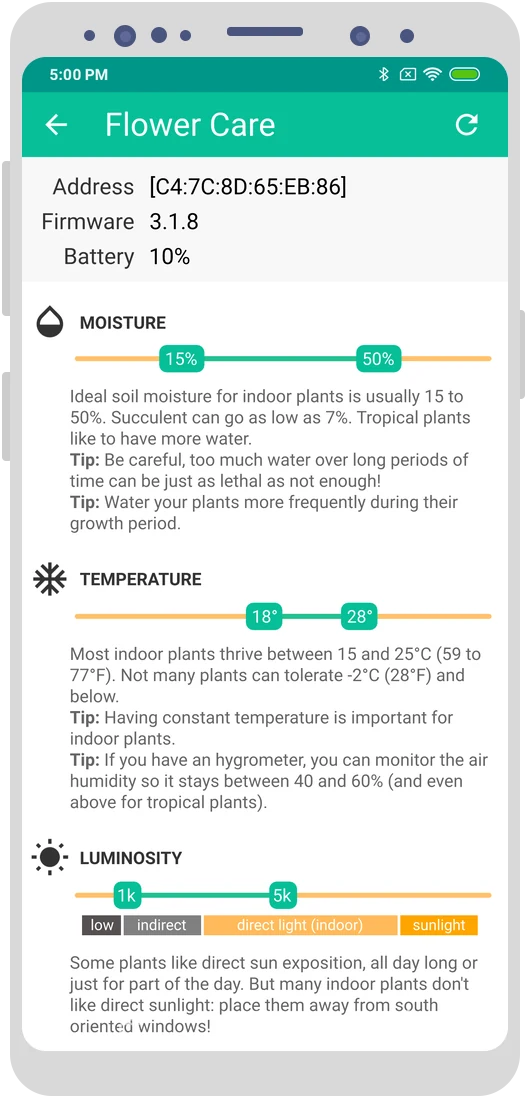
Plant care limits and tips for moisture, temperature and luminosity Live readings and history chart of a Flower Care sensor
03 Hardware

Supported sensors

Plant sensors, thermometers, clocks, environmental monitors and DIY boards, from Xiaomi and Parrot to Aranet, Govee, Ruuvi, SwitchBot and Inkbird.

Xiaomi · VegTrug

Flower Care

Grow Care Home, and most variants

  • Soil moisture
  • Soil conductivity
  • Air temperature
  • Light
  • History
Which variant do I have?
  • White: international (or old Chinese) variants.
  • Green: Chinese variants.
  • Pink: Tuya variants, actually entirely different devices. They must be added to their official application once to work with WatchFlower.
  • Black: no Bluetooth at all. They won't work with any application.
Xiaomi · VegTrug

Flower Care Max

Grow Care Garden

  • Soil moisture
  • Soil conductivity
  • Air temperature
  • Light
  • History
Xiaomi · VegTrug

RoPot

Grow Care Pot, and variants

  • Soil moisture
  • Soil conductivity
  • Air temperature
  • History
Parrot

Flower Power

  • Soil moisture
  • Soil conductivity
  • Soil temperature
  • Air temperature
  • Light
Parrot

Parrot Pot

  • Soil moisture
  • Soil conductivity
  • Soil temperature
  • Air temperature
  • Light
  • Water tank
Watering supported

All four watering modes are supported: manual, Perfect drop, Plant sitter and custom.

XiaomiLYWSDCGQ

Digital Hygrometer

LCD screen

  • Temperature
  • Humidity
ClearGrassCGG1

Temperature & Humidity Monitor

E-Ink screen

  • Temperature
  • Humidity
Which variant?

The Qingping 'M' variant of this sensor is supported, while the 'H' variant is not.

QingpingCGDK2

Temp & Humidity Monitor Lite

LCD screen

  • Temperature
  • Humidity
XiaomiLYWSD03MMC

Digital Hygrometer 2

LCD screen

  • Temperature
  • Humidity
XiaomiMHO-C401

Digital Hygrometer 2

E-Ink screen

  • Temperature
  • Humidity
MiaomiaoceXMWSDJO4MMC

Thermo-Hygrometer

E-Ink screen

  • Temperature
  • Humidity
ThermoBeacon

ThermoBeacon

LCD screen

  • Temperature
  • Humidity
  • History
ThermoBeacon

ThermoBeacon

Round keychain

  • Temperature
  • Humidity
  • History
ThermoBeacon

ThermoBeacon

Diamond keychain

  • Temperature
  • Humidity
  • History
New in 6.0
Aranet

Aranet2

Temperature & humidity sensor

  • Temperature
  • Humidity
New in 6.0
Ruuvi

RuuviTag

Environmental sensor tag

  • Temperature
  • Humidity
  • Pressure
New in 6.0
Govee

Thermo-Hygrometers

20 models

  • Temperature
  • Humidity
Supported models

H5051, H5052, H5071, H5072, H5074, H5075, H5100, H5101, H5102, H5103, H5104, H5105, H5108, H5110, H5112, H5129, H5174, H5177, H5178 and H5179.

New in 6.0
SwitchBot

Meter

Meter, Meter Plus, Meter Pro and Indoor/Outdoor Thermo-Hygrometer

  • Temperature
  • Humidity
New in 6.0
Inkbird

Thermo-Hygrometers

IBS-TH, IBS-TH2, ITH-11-B, ITH-13-B and ITH-21-B

  • Temperature
  • Humidity
Pool thermometers too

The IBS-P01B and IBS-P02B pool thermometers are supported as well, with temperature only.

Custom firmware

ATC thermometers

Thermometers running the ATC custom firmware

  • Temperature
  • Humidity
XiaomiLYWSD02

Digital Hygrometer Clock

  • Temperature
  • Humidity
  • Clock
XiaomiMHO-C303

Digital Hygrometer Alarm Clock

  • Temperature
  • Humidity
  • Clock
QingpingCGD1

Bluetooth Alarm Clock

  • Temperature
  • Humidity
  • Clock
QingpingCGP1W

Temp & RH Barometer Pro S

  • Temperature
  • Humidity
  • Clock
New in 6.0
MiaomiaoceMJWSD05MMC

Smart Temperature & Humidity Meter 3

  • Temperature
  • Humidity
  • Clock
VSONWP6003

Air Box

  • Temperature
  • VOC
  • HCHO
  • CO2 (estimated)
HoneywellJQJCY01YM

Formaldehyde Detector

  • Temperature
  • Humidity
  • HCHO
QingpingCGDN1

Air Monitor Lite

  • Temperature
  • Humidity
  • PM 2.5
  • PM 10
  • CO2
One-time setup

This sensor must be added to its official application once to work with WatchFlower. Install the "Xiaomi Home" application, register (sorry...), set the sensor up, then go to "additional settings" and enable "BLE Gateway".
New in 6.0
Aranet

Aranet4

CO2 monitor

  • Temperature
  • Humidity
  • Pressure
  • CO2
New in 6.0
Aranet

Aranet Radon

Radon and Radon Plus

  • Radon
  • Pressure
Radon Plus

The Aranet Radon Plus also reports temperature and humidity.

New in 6.0
Aranet

Aranet Radiation

Radiation dosimeter

  • Radiation dose
New in 6.0
Ruuvi

Ruuvi Air

Indoor air quality monitor

  • Temperature
  • Humidity
  • Pressure
  • Light
  • PM 1
  • PM 2.5
  • PM 10
  • CO2
New in 6.0
Govee

Air Quality Monitors

H5106 (PM 2.5) and H5140 (CO2)

  • Temperature
  • Humidity
  • PM 2.5
  • CO2
New in 6.0
SwitchBot

Meter Pro CO2

  • Temperature
  • Humidity
  • CO2
New in 6.0
InkbirdIAM-T2

Air Quality Monitor

  • Temperature
  • Humidity
  • CO2
ESP32 board

HiGrow

With custom firmware

  • Soil moisture
  • Soil conductivity
  • Air temperature
  • Air humidity
  • Light
Should I get one?

I would not really recommend buying one for serious plant monitoring. But if you already have one, the custom firmware is a great way to start tinkering with these boards.

Open hardware

b-parasite

With custom firmware

  • Soil moisture
  • Air temperature
  • Air humidity
  • Light
ESP32 DIY

Air Quality Monitor

Build this one, or a compatible one

  • Temperature
  • Humidity
  • Light
  • Sound level
  • O2
  • O3
  • CO
  • CO2
  • NO2
  • VOC
  • PM 1
  • PM 2.5
  • PM 10
ESP32 DIY

Weather Station

Build this one, or a compatible one

  • Temperature
  • Humidity
  • Barometer
  • Light
  • UV
  • Wind speed
  • Wind direction
  • Rain gauge
ESP32 DIY

Geiger Counter

Build this one, or a compatible one

  • Radioactivity
ESP32 DIY

Environmental Sensing Service

Any sensor using the standard Bluetooth ESS profile

  • Temperature
  • Humidity
  • Pressure
  • UV

Let's add more sensors!

WatchFlower aims to support as many Bluetooth sensors as possible. If you develop a Bluetooth Low Energy sensor, or know a good one, get in touch!

Contact us
04 Screenshots

See it in action

WatchFlower on the desktop, teal theme
Desktop
Plant list on Android
Your plants
Sensor details with live readings and charts
Live readings
WatchFlower on the desktop, yellow theme
Sunny theme
Monthly sensor histograms
History
Plant care limits and tips
Care limits
WatchFlower on a tablet
Tablet
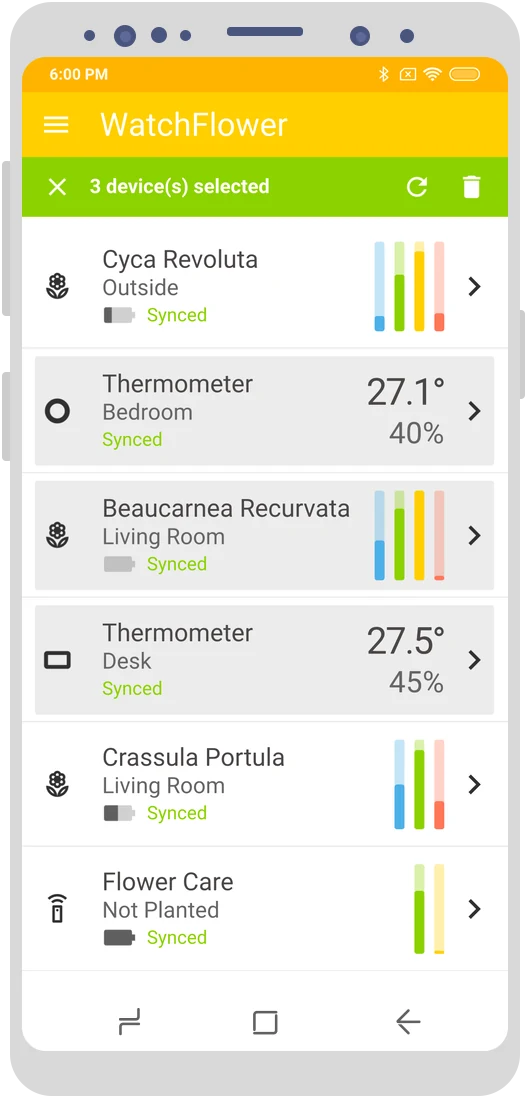
Selecting several devices to update them at once
Multi-select
WatchFlower on the desktop, dark theme
Night theme
Plant list on Android, dark theme
Dark mode
05 Download

Get WatchFlower

Version 6.0 Release notes
14 languages

Chinese, Danish, Dutch, English, French, Frisian, German, Hungarian, Norwegian, Polish, Russian and Spanish.

Need help?

Head over to the support page.

Privacy policy

No data collection, no data usage.

Found a bug?

Report it on the issue tracker.

06 Good to know

Questions, answered

Bluetooth Low Energy comes with a few quirks, especially on mobile. Here's what to expect.

Visit the support page
  • iOS will only ask you for permission to use Bluetooth. Learn more on the Apple support website.

  • The Android 12+ operating systems needs the BLUETOOTH_SCAN and BLUETOOTH_CONNECT permissions.
    Learn more on the Android developer website.

  • The Android operating systems (11 and below) needs the BLUETOOTH permission.
    The Android operating systems also requires applications to ask for the device location permission in order to scan for nearby Bluetooth Low Energy sensors.
    Android 10+ will ask for ACCESS_FINE_LOCATION, while Android 6+ will only ask for ACCESS_COARSE_LOCATION.
    Learn more on the Android developer website.

    WatchFlower is neither using nor storing your location. Sorry for the inconvenience.

  • Background updates require the additional ACCESS_BACKGROUND_LOCATION permission, for the same reasons as above. You can deny it, but background updates will then be much less efficient.

    Android phones also try very hard to prevent applications from starting in the background, then kill every application running there. Depending on your phone model and manufacturer, you will have to manually enable auto launch and manually disable various battery saving features. dontkillmyapp.com has per-device steps to help you do that.

  • These are Bluetooth sensors, not Internet-connected sensors: your phone or computer always has to be in proximity of the sensors to check for updates.
    Sensors with history support (Flower Care, RoPot and ThermoBeacon) can sync what they recorded in the meantime.

  • Some sensors must be added to their official application once before they work with WatchFlower. That's the case for the pink (Tuya) Flower Care variant, and for the Qingping Air Monitor Lite: install "Xiaomi Home", register (sorry...), set the sensor up, then go to "additional settings" and enable "BLE Gateway".

  • No. This project is NOT associated with Xiaomi, Parrot, or any device manufacturer.

Free software

GPLv3 licensed

WatchFlower is free software: you can redistribute it and/or modify it under the terms of the GNU General Public License, version 3 or (at your option) any later version.

Read about the GPLv3
Get involved

Help it grow

Users can help find and report bugs, suggest new features or improve the documentation.
Developers can browse the code and submit patches and pull requests. Your help is greatly appreciated ;-)